


The Best Voice of the Customer Tools for Research and Product Teams
Explore the best voice of the customer tools, learn how to turn customer feedback into actionable insights, and validate AI-generated themes before making decisions.



Voice of the customer (VoC) tools come in many forms. Some are simple survey platforms. Others are enterprise suites that analyze support tickets, call recordings, and reviews together. Because these tools do such different jobs, they're hard to compare side by side.
The right choice depends on where your research or product team needs the most help. That might be collecting more feedback, analyzing it, or sharing findings with decision-makers.
The seven VoC tools below are grouped by the job they do best. Each entry covers the tool's strengths, limitations, and pricing.

TL;DR: Voice of the customer tools at a glance
- Marvin: An AI-native customer insights platform that runs research and analyzes all feedback in one hub.
- Qualtrics: An experience management suite for survey-led VoC programs across many channels.
- Medallia: An experience management suite for contact centers and multi-location enterprises.
- Sprinklr Insights: A social listening platform that tracks public conversations about your brand.
- Enterpret: A feedback analytics platform for product teams at software companies.
- Thematic: A feedback analytics platform for open-ended survey comments, with editable themes.
- Survicate: A survey platform for targeted surveys on the web, in-product, and by email.
What voice of the customer tools do
A VoC program is the ongoing work of gathering and analyzing customer feedback. Teams then use the patterns they find to inform product decisions.
VoC tools support that work. Most cover some or all of these four jobs:
- Collect solicited feedback: Solicited feedback is feedback you ask for through surveys, interviews, and in-product prompts. Plan how you'll collect customer feedback before you choose a tool. The channels you choose shape which customers you hear from.
- Capture unsolicited feedback: Customers also share feedback without being asked, in support tickets, reviews, social posts, and sales calls. That's unsolicited feedback. VoC tools bring it in through integrations or by monitoring public channels.
- Analyze: The tool scans every comment and finds the topics that keep coming up. Tools call these topics themes. It also marks each comment as positive or negative. That shows which problems are most common and which customers have them.
- Share findings: Once you've found the themes, the tool shares them with the people who make decisions. It sends them to the tools those people already use, such as a product backlog, team chat, or customer relationship management (CRM) system.

The best voice of the customer tools
The list runs by type. A customer insights platform comes first, followed by enterprise suites, social listening, feedback analytics, and a survey platform.
Prices come from each vendor's pricing page or documentation.
Here's how the seven tools compare:
Here's who each tool suits, what it does, and what to keep in mind:
1. Marvin
Best for: Research and product teams that want to run studies and analyze all feedback together.
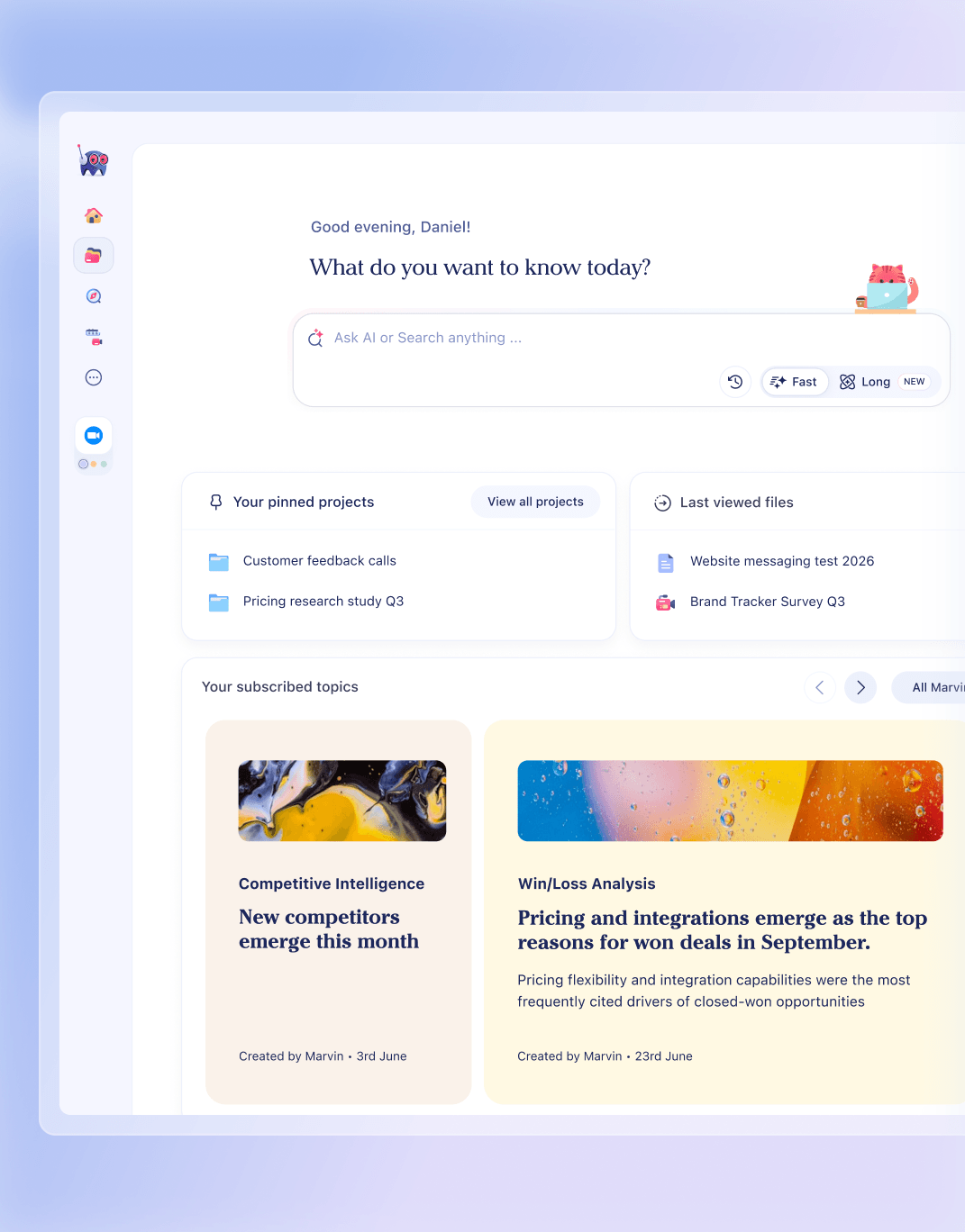
Marvin is an AI-native customer insights platform. Teams use it to run studies and to store, analyze, and share customer feedback.
Say your Net Promoter Score (NPS) drops. The AI Moderated Interviewer helps you ask customers why.
It runs voice interviews from your discussion guide in more than 40 languages. You set how deeply it follows up on each question.
To hear from users right after an experience, use Live Intercept. It invites website visitors or product users to a voice interview. The invite appears when they reach a page or event you choose.
For live interviews, the AI Notetaker joins Zoom, Google Meet, or Microsoft Teams calls. It transcribes calls and takes notes.
To recruit participants, the research panel syncs with your CRM. That way, you can invite your own customers to any study.
More than 30 integrations bring in feedback customers give across platforms. They connect Marvin to tools such as Zendesk, Intercom, and Gong.
In Analysis Studio, you can then run thematic and sentiment analysis across every source. You can work in one project or across several.
Marvin stores everything in the Knowledge Hub under one global taxonomy, a shared tag set. Because every source uses the same tags, you can compare feedback across sources. For example, you can see when a support issue also comes up in interviews.
Ask AI (Marvin's built-in AI assistant) answers questions about your research and cites the source quotes.
To share findings, you can build insight reports and video clips. You can also send insights to Slack, Figma, and Salesforce. Marvin MCP (Model Context Protocol) lets AI assistants such as Claude and ChatGPT search your research.
When Criteo evaluated Marvin, it ran a five-week proof of concept. The test covered interviews, customer satisfaction (CSAT) surveys, and more than 1,000 Intercom conversations. Criteo then chose Marvin to centralize feedback from sales, product marketing, design, and product.
Marvin offers a free plan and paid plans with custom pricing. Access varies by seat type. You can add AI-moderated interviews and Live Intercept to any paid plan.
Strengths:
- You can run interviews and analyze feedback in the same tool, so nothing moves between systems.
- Free viewer seats let executives and other stakeholders read insights without editing them.
- Marvin is SOC 2 Type II, ISO 27001, and ISO 42001 certified and GDPR compliant.
- You can store data in the US or EU.
Keep in mind:
- Marvin doesn't track in-product behavior such as clicks and funnels.
- If your VoC program needs behavior data, you'll have to pair it with a product analytics tool.
Book a demo and bring a month of support tickets and survey comments. You'll see how Marvin links each theme to the quotes behind it.
2. Qualtrics
Best for: Large organizations that run survey-led VoC programs across many teams, regions, and channels.
Qualtrics is an experience management platform. Its Customer Experience suite brings together feedback from many channels. These include surveys, contact centers, digital interactions, online reviews, and social media.
Its text analytics groups open-ended feedback into topics automatically. Analysts don't have to tag every comment by hand.
As of the time of writing, Qualtrics has completed its acquisition of Press Ganey Forsta, which had earlier bought InMoment. So if your team uses Forsta or InMoment, those products now belong to Qualtrics.
Strengths:
- Qualtrics offers advanced survey design and statistical analysis.
- Admin controls let you set who can see and edit what, which helps when several business units share one account.
Keep in mind:
- You can't set up multi-channel feedback collection yourself. Qualtrics staff configure it for you, so plan time for that setup before you can start.
- The free account covers basic surveys only, with 500 total responses.
3. Medallia
Best for: Enterprises with contact centers and many locations that want all feedback in one view.
Medallia is an experience management platform. Medallia Experience Cloud captures feedback from surveys, digital channels, contact center calls, and video.
Its text analytics and generative AI reporting group feedback into themes. They also summarize feedback and help analysts find root causes.
Speech analytics through Voci, a Medallia product, lets teams analyze call recordings alongside survey comments.
Strengths:
- Medallia puts survey answers next to other signals, such as recorded support calls and website behavior.
- That suits companies with many stores or branches that want to compare customer experience by location.
Keep in mind:
- Medallia publishes no prices and lists no free plan.
- You'll need a sales conversation to compare cost.
4. Sprinklr Insights
Best for: Brand, marketing, and CX teams that monitor public conversations about their brand and competitors.
Sprinklr Insights is a consumer intelligence platform. It tracks conversations across more than 30 social, review, and digital channels.
Teams use it for social listening, brand monitoring, competitive intelligence, and crisis management.
Strengths:
- Sprinklr Insights helps you track what people say publicly about your brand.
- You can compare that with what people say about competitors.
Keep in mind:
- Like online reviews, public posts can over-represent strong opinions.
- Before you act on a spike in social complaints, check whether your own customers say the same in surveys or support tickets.
5. Enterpret
Best for: Product and CX teams at software companies with many support tickets, call transcripts, and reviews.
Enterpret is a customer intelligence platform. It unifies feedback from support, sales calls, reviews, and surveys. It trains a custom AI model on each client's feedback data.
It also updates its taxonomy every week. The taxonomy is the set of categories it tags feedback with.
Strengths:
- Every plan includes unlimited user seats, so anyone in the company can search feedback.
- Dedicated data auditors and a customer success manager help your team with setup.
Keep in mind:
- Enterpret suits teams with high feedback volumes.
- Pricing grows with data volume and the number of integrations you connect.
6. Thematic
Best for: Insights and CX teams that analyze many open-ended survey comments and edit themes themselves.
Thematic is a feedback analytics platform. It finds themes and sentiment in open-ended feedback. It also shows how each theme affects scores such as NPS.
Its Lenses feature combines several datasets under one set of themes. Thematic Answers lets you ask questions and trace each answer to its source comments.
Every plan includes integrations with tools such as Zendesk, Intercom, Gong, and Trustpilot.
Strengths:
- The AI groups comments into themes, and you can rename, merge, or split those themes yourself.
- It also shows which themes drag your NPS down and which ones push it up.
Keep in mind:
- Thematic works best with at least 2,000 rows of comments.
- The Foundation plan covers 25,000 comments a year across up to three datasets.
7. Survicate
Best for: Product and marketing teams that want targeted surveys on the web, in-product, and by email.
Survicate is a customer feedback platform for running surveys by email, link, or QR code. You can also run surveys on websites, in web and mobile apps, and in Intercom.
On the Growth plan, Research Hub and AI features analyze feedback from other sources too.
Strengths:
- At $56 a month billed yearly, it costs far less than the enterprise tools on this list.
- It can run surveys inside Intercom chats and mobile apps, instead of just on web pages.
Keep in mind:
- The free plan includes 25 responses a month only, and paid plans charge by monthly responses.
- The Starter plan allows two active surveys at a time.
How to choose a voice of the customer tool
Once you know what each tool does best, look at your own VoC program. That's how you narrow down your options.
Here's how to do it, step by step:
- Name the decisions your feedback should inform: List the decisions coming up, such as next quarter's roadmap or a pricing change. A voice of the customer framework helps you connect each decision to the right feedback.
- Map the feedback you have and the feedback you're missing: Sort every source into solicited and unsolicited feedback. Surveys and interviews are solicited, while support tickets, reviews, and sales calls are unsolicited. Is most of your feedback unsolicited? Choose a tool that also lets you run research to fill the gaps.
- Decide whether you need collection, analysis, or both: Survey platforms help you ask questions. Feedback analytics platforms help you understand the feedback you already have. Enterprise experience suites and customer insights platforms do both.
- Check that every theme traces back to its source: Open a theme in each tool and click through to the feedback behind it. If you can't see who said it and where, the finding is hard to defend.
- Check who can see the results: Compare seat pricing, viewer access, and integrations with your team's planning tools. Feedback can only influence decisions if the people making them can see it.
- Test each tool with a question your team needs answered: Most vendors offer a trial or demo. Instead of a sample dataset, use a question your team is working on right now, such as why customers cancel in their first month. Upload the same survey comments and support tickets to each tool, then see which one answers it best.

How to check AI-generated themes before they reach a decision
Every tool on this list uses AI to group feedback into themes. Say 40 support tickets and 15 survey comments all complain about confusing invoices. The tool puts them under one theme and labels it billing confusion.
AI lets you analyze far more feedback in the same time. But a theme is still a summary, and summaries can be wrong.
So before a theme goes into a roadmap review, run these checks:
- Read the comments behind each theme: Open a sample of the comments and confirm they say what the theme's label says.
- Split themes that mix different problems: Take the billing confusion theme from the start of this section. Some customers say the price is too high. Others say the invoice shows the wrong amount. The first is a pricing decision, and the second is a bug. Split them into two themes so each team sees its own problem.
- Check where the comments came from: A theme built mostly from reviews or social posts reflects the people who post there. Check whether survey and interview feedback shows the same thing.
- Give one person ownership of the tags: A researcher or ResearchOps lead should review the tags each quarter. They merge duplicates and retire unused tags, so every team tags feedback the same way.
- Confirm big decisions with your own research: Before you commit roadmap time to a theme, talk to a few of the customers behind it. A short round of interviews or a quick survey is enough.
AI speeds up the analysis. Researchers still decide which themes are accurate, what they mean, and what to act on. That judgment comes from knowing your customers and your product, which no tool can supply on its own.
Bring every customer signal into one place before your next decision
Feedback shows you where customers struggle and what they value. To act on it, you also need to know why, backed by evidence.
Marvin helps with both. It brings survey comments, support tickets, and sales calls into one searchable Knowledge Hub. There, you can see every theme alongside the customer quotes behind it.
When a theme raises a new question, ask customers directly with the AI Moderated Interviewer. Marvin adds their answers to the same hub as the rest of your feedback.
Book a demo to see how Marvin works.
Frequently asked questions
Survey tools are one type of VoC tool. They help you design questionnaires, send them, and review the responses. Other VoC tools add unsolicited feedback, such as support tickets and reviews. They analyze it alongside your survey results.
No. NPS is a metric that measures how likely customers are to recommend your product. VoC tools are where you collect and analyze that score. The score alone won't tell you why it changed. So ask an open-ended follow-up question, such as the main reason for the score, and track other VoC metrics alongside it.
No. NPS is a metric that measures how likely customers are to recommend your product. VoC tools are where you collect and analyze that score. The score alone won't tell you why it changed. So ask an open-ended follow-up question, such as the main reason for the score, and track other VoC metrics alongside it.
One person should own it, usually a CX, research, or insights lead. They keep the tag system consistent and check the themes the AI produces before anyone acts on them.
Everyone else contributes in their own role:
- Support and customer success teams collect and tag most of the feedback.
- Product managers then use the findings for roadmap decisions.
- Design teams use them to shape solutions.

See Marvin AI in action
Want to spend less time on logistics and more on strategy? Book a free, personalized demo now!